

Deploying WhiteOwl Networks
From Install to Full Network Visibility
WhiteOwl Networks is designed to be powerful, scalable, and straightforward to deploy. Whether you’re monitoring a small environment or a high-throughput enterprise network, the architecture is flexible enough to grow with you—without forcing unnecessary complexity on day one.
This post walks through how WhiteOwl is deployed, how scale is determined, and how visibility is built step by step after installation.
Quickstart: https://whiteowlnetworks.net/docs/quickstart
Centralized Deployment on Ubuntu 24
The WhiteOwl centralized platform can be installed on any Ubuntu 24 host, giving operators full control over where and how the system runs—on-prem, in a private cloud, or in a hosted environment.
The platform runs as a modern, distributed application, with scale driven primarily by:
- CPU
- Memory
- Disk performance (SSD strongly recommended)
Rather than fixed licensing limits, capacity is dictated by available resources.
Scaling by Hardware
As an example:
- 32-core CPU (modern)
- 64 GB of RAM
- Fast SSD storage
can comfortably ingest ~100,000 flows per second (FPS) on a single node, while also supporting:
- SNMP polling
- Log ingestion
- Synthetic testing
- Configuration data
- Analytics and alerting
As environments grow, additional resources or nodes can be added to scale ingestion and retention.
Initial Platform Setup: Define Your Network
Once the centralized WhiteOwl platform is deployed, the next step is to define what you want to monitor.
Define Sites
Sites provide logical grouping for visibility and operations. They allow you to organize devices, probes, and telemetry by:
- Location
- Environment
- Business unit
- Network domain
Sites can be defined manually through the UI or imported automatically.
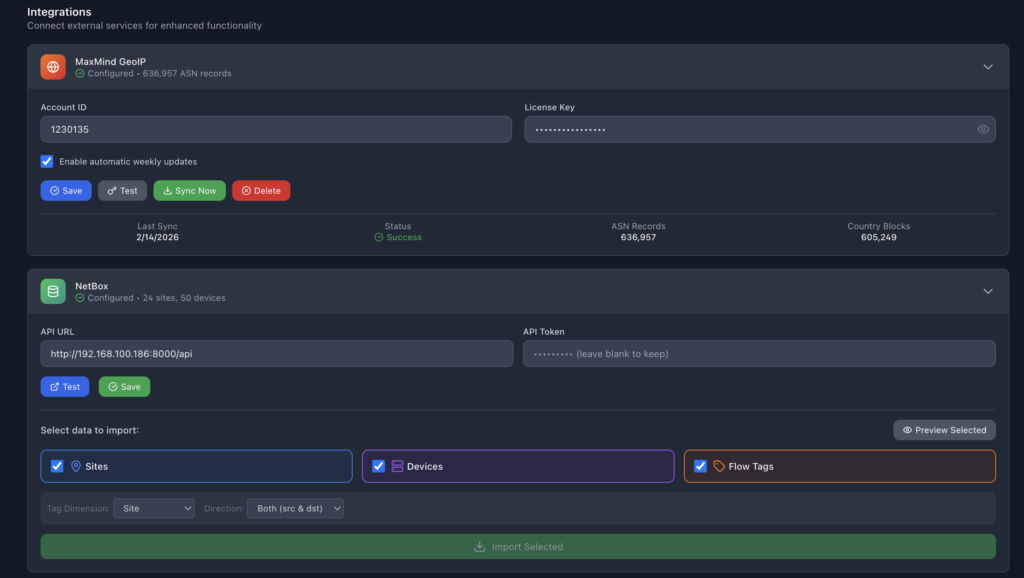
Optional: Import Sites from NetBox
For teams already using NetBox, WhiteOwl integrates directly through the UI. This allows:
- Sites
- Subnets
- Devices
to be imported automatically, accelerating onboarding and ensuring consistency with your source of truth.
SNMP Discovery and Auto-Configuration
Once sites are defined, WhiteOwl makes device discovery simple and automated.
Configure Discovery Subnets
Operators specify the IP subnets where WhiteOwl should perform SNMP discovery. These subnets determine where devices will be found and monitored.
Configure SNMP Credentials
WhiteOwl supports standard SNMP credentials, which are configured once and reused across discovery and polling.
After credentials are set, SNMP is enabled, and discovery begins.
Intelligent SNMP Auto Discovery
During discovery, WhiteOwl:
- Polls devices via SNMP
- Identifies the vendor and device type
- Automatically determines which MIBs to use
- Begins collecting key telemetry, including:
- CPU utilization
- Memory usage
- Interface statistics
- Interface speed and status
- Device name and IP address
- Interface names and identifiers
This removes the need for manual per-vendor configuration and accelerates time to value.
Topology Discovery with LLDP
Visibility isn’t complete without understanding how devices are connected.
WhiteOwl builds network topology automatically using LLDP. To enable full topology mapping:
- Ensure LLDP is enabled on each network device
Once enabled, WhiteOwl correlates LLDP data with SNMP discovery to:
- Build a live topology map
- Show device-to-device connections
- Identify interfaces and link relationships
This topology becomes the foundation for faster troubleshooting and better network understanding.
From Deployment to Insight—Fast
With just a few steps:
- Install WhiteOwl on Ubuntu 24
- Size hardware based on ingestion needs
- Define sites
- Configure discovery subnets and SNMP credentials
- Enable LLDP
WhiteOwl begins building a comprehensive view of your network—devices, performance, topology, and behavior—within minutes.
Built to Grow with Your Network
WhiteOwl’s deployment architecture is intentionally simple at the start, but powerful as environments scale. Whether you’re monitoring thousands of devices, ingesting high-volume flow data, or deploying probes across remote sites, the platform adapts without forcing architectural rework.
This is network observability designed for how networks actually evolve.